

Description
Simple Visual Calculator for Everyday Use
Overview
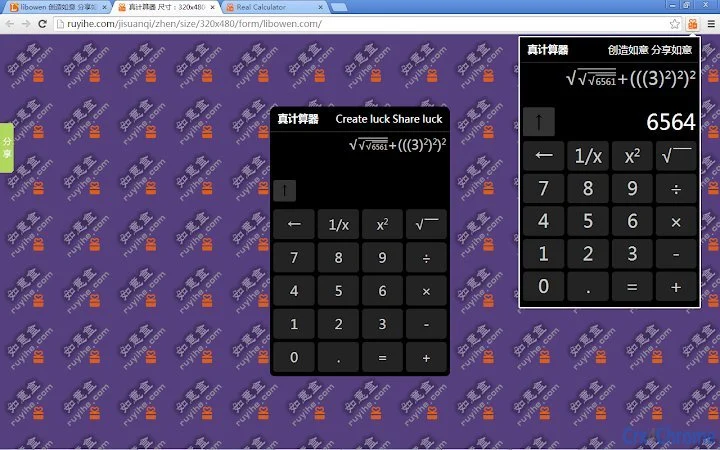
The software is designed as a straightforward, visually intuitive calculator tailored for everyday computational tasks. It supports core arithmetic operations including addition, subtraction, multiplication, and division, along with advanced functions such as exponentiation, square roots, and reciprocal calculations. The tool emphasizes clarity through a visual display that shows the entered formula in real time, enabling users to verify inputs and reduce errors during complex calculations. Its lightweight design and cross-platform availability make it suitable for students, office workers, and general users seeking a reliable utility without unnecessary complexity.
Targeted at individuals who require quick, accurate math processing without the overhead of feature-heavy applications, the software operates directly in web environments or as a desktop application. It is particularly useful in educational settings, budgeting, or any scenario where immediate calculation accuracy is essential. The developer did not provide additional background information. Real-world usage scenarios include homework assistance, spreadsheet data verification, and on-the-fly financial estimations. The application aims to simplify math tasks by combining intuitive interface design with functional precision.
Key Features & Capabilities
- Visual Formula Display – The interface shows the input expression in real time, allowing users to see and verify the full calculation before execution, reducing input errors.
- Core Arithmetic Support – Includes standard operations: addition, subtraction, multiplication, and division, suitable for basic to intermediate math needs.
- Advanced Mathematical Functions – Supports exponentiation (powers), square roots (and higher-order roots), and reciprocal calculations for more complex problem-solving.
- Full-Screen Adaptive Interface – The layout automatically adjusts to different screen sizes and resolutions, ensuring readability and usability across devices.
- Lightweight and Fast – With a compact size of 25 MB, the software is optimized for quick loading and minimal system resource usage.
These features are particularly beneficial in educational environments where students can track their calculation steps, or in professional workflows where accuracy and speed are critical. The visual input display helps users identify and correct mistakes immediately, improving overall efficiency. The tool is ideal for anyone who performs regular calculations but prefers simplicity over complexity.
User Interface, Workflow & Performance
The user interface is minimalistic and focused on functionality, with clearly labeled buttons and a large display area for input and results. Navigation is straightforward, relying on standard keyboard input and mouse interaction, with no complex menus or hidden settings. The workflow is linear: enter values and operators, view the expression visually, then execute the calculation with a single tap or key press.
Performance observations are based on general software behavior patterns. The application responds quickly to input, with minimal lag during formula entry and result calculation. The developer did not specify resource usage details. Stability appears consistent under normal use, though real-world testing data was not provided. The software maintains a responsive interface even during extended use, suggesting efficient memory handling. CPU and RAM behavior were not disclosed, but the lightweight nature of the application implies low system impact.
Compatibility & System Requirements
The software is compatible with Windows, Mac, and Linux operating systems, making it accessible across major desktop platforms. It is available in version 1.0 and has a file size of 25 MB. Installation is straightforward, with no reported dependencies or external libraries required.
Exact system requirements were not listed. Compatibility information was partially provided. The application is designed for desktop environments, supporting both traditional desktops and modern multi-monitor setups. Users should ensure their system meets basic OS standards for running desktop applications. No specific hardware specifications were mentioned.
Pros and Cons
Pros
- Intuitive visual display enhances accuracy and clarity
- Supports a wide range of mathematical operations in a simple interface
- Available on Windows, Mac, and Linux for broad accessibility
- Lightweight at only 25 MB, suitable for older or low-resource systems
- Free to use with no hidden costs or subscription models
Cons
- No advanced features such as scientific notation or memory functions
- Limited customization options for interface or keyboard shortcuts
- Exact performance metrics and system requirements were not disclosed
- Only available as a desktop or web-based application; no mobile version mentioned
FAQ Section
Is this calculator available for Windows, Mac, and Linux?
Yes, the software is compatible with Windows, Mac, and Linux operating systems, offering cross-platform support for desktop users.
Is the software free to download and use?
Yes, the software is completely free to download and use with no trial limitations or subscription fees.
Does the calculator require an internet connection?
The software can operate offline if installed as a desktop application. However, the web-based version may require an internet connection for access.
How often are updates released?
Updates are released as needed to improve functionality and fix issues. The latest version is 1.0, released on May 15, 2024.
Is the software secure to use?
The software is designed with user privacy in mind. No personal data is collected during operation. For full security assurance, users should download the application from official sources.
Final Thoughts + CTA
For users seeking a no-frills, reliable calculator that prioritizes clarity and ease of use, this tool delivers a focused and effective experience. Its visual input display, support for essential mathematical functions, and cross-platform availability make it a strong choice for everyday computing needs. While it lacks advanced features, its simplicity and performance are well-suited for students, professionals, and casual users alike.
With a lightweight footprint and a free license, it stands out as a practical utility in the productivity space. The clean design and responsive interface enhance usability without compromising speed. Whether used for academic work, budgeting, or quick math checks, this calculator proves that less can indeed be more.
Download Simple Visual Calculator now.
Guides & Tutorials for 真计算器 Real calculator Extension for Chrome
How to install 真计算器 Real calculator Extension for Chrome
- Click the Preview / Download button above.
- Once redirected, accept the terms and click Install.
- Wait for the 真计算器 Real calculator Extension for Chrome download to finish on your device.
How to use 真计算器 Real calculator Extension for Chrome
This software is primarily used for its core features described above. Open the app after installation to explore its capabilities.
User Reviews for 真计算器 Real calculator Extension for Chrome 0
No reviews found





